Data synchronization with Merge statement
February 1, 2023
During your whole career as a software engineer, you will have to solve many business problems that will require you to write complex SQL's. You may need to improve your SQL skills by learning different functions/features a database provide. In these series of article i will share some advance SQL statements that can be utilized to write more efficient SQL statements.
MERGE Statement
A merge statement can be used to insert, update and delete data from a table at same time. The MERGE statement require a target table and a source table to match the records. If the match occurs you can update or delete the data, otherwise you can insert the missing rows.
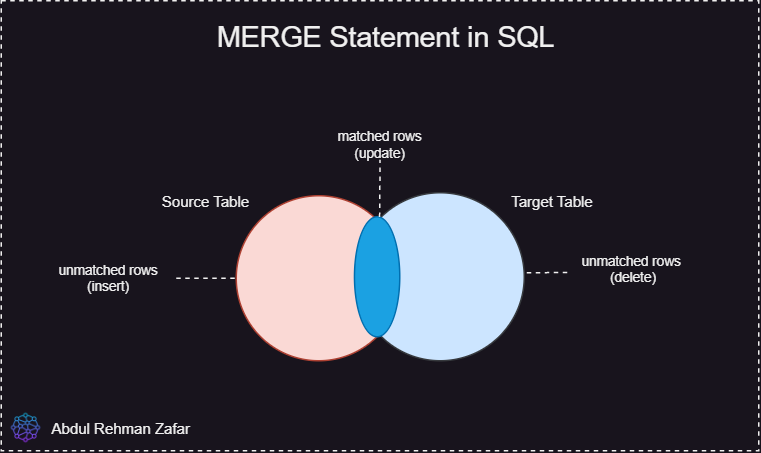
Real world scenario to understand use of MERGE statement
Suppose you have a distributed system that is composed of several services running independently. One of the service is responsible to publish Employee details on daily basis publishing information like new joiners, employees who resigned and updates in salary information etc. Regardless of the mechanism let just consider you receive the daily updated data and saved it in a temporary table Employee_Daily_Updates (source table). The application has to make sure that the updated employee information received should become part of the actual employee data (target table) in your database. Following requirements should be met.
- If a new employee has joined then it should be added into the actual employee table
- if there is an update on employee information (email, salary, manager) then we should update the data accordingly.
- if the employee left the company, then we should delete it, in this case let just suppose the department of the employee will be empty.
Let us consider Employee Table (Target Table) has following Schema and initial Data
| Employee_Id | First_Name | Last_Name | Hire_Date | Salary | Manager_Id | Department_Id |
|---|---|---|---|---|---|---|
| 1 | Abdul | Rehman | 11-Jan-2019 | 1000 | 4 | 1 |
| 2 | Usman | Ali | 15-May-2020 | 2000 | 4 | 1 |
| 3 | Owais | Ahmed | 23-Nov-2022 | 3000 | 2 | 1 |
| 4 | Tahir | Khan | 23-Nov-2015 | 5000 | null | 1 |
And consider data we have in Employee_Daily_Updates (Source Table) is as follows.
| Employee_Id | First_Name | Last_Name | Hire_Date | Salary | Manager_Id | Department_Id |
|---|---|---|---|---|---|---|
| 1 | Abdul | Rehman | 11-Jan-2019 | 1000 | 4 | null |
| 2 | Usman | Ali | 15-May-2020 | 2500 | 4 | 1 |
| 5 | Danish | Ikram | 18-Sep-2023 | 3000 | 4 | 1 |
- The first record above employee_id equals 1 highlights the employee has left the company
Department_Idis null (DELETE case). - The second reocrd above employee_id equals 2, highlights the employee Salary is updated (from 2000 to 2500) (UPDATE case).
- The third reocrd above employee_id equals 5, highlights the employee is a new joiner (INSERT case).
To fulfill these requirements either we can write seperate SQL statements for INSERT, UPDATE and DELETE or we can use a better alternative i.e. MERGE.
MERGE Statement Syntax
The baic syntax for writing a MERGE statement is as follow for Oracle Database.
MERGE   INTO    *target_table* as *table_alias*

USING   (table|view|query)   src

ON  ( join codition )

WHEN MATCHED THEN

    UPDATE SET
        column_name_1 = value1,
        column_name_2 = value1

    DELETE (condition)

WHEN NOT MATCHED THEN

insert (columns)

values (values);
MERGE SQL For Employee Scenario
For our scenario the MERGE statement will be like this.
MERGE   INTO    Employees   AS trg

USING   (SELECT * FROM Employee_Daily_Updates) AS   src

ON  (   trg.Employee_Id =   src.Employee_Id  )

WHEM MATCHED THEN
    UPDATE SET
        TRG.SALARY = SRC.SALARY,
        TRG.MANAGER_ID = SRC.MANAGER_ID

    DELETE WHERE DEPARTMENT_ID IS NULL

WHEN NOT MATCHED THEN

INSERT values (src.Employee_Id,
    src.First_Name,
    src.Last_Name,
    src.Hire_Date,
    src.Salary,
    src.Manager_Id,
    src.Department_Id
);
Look how easily we manage to fulfill all requirements using MERGE Statement instead of writing three different SQL's for INSERT, UPDATE, DELETE. I hope this article helped you in understanding MERGE statement, cheers :).