Kubernetes Networking: Services, Ingress & Network Policies
June 23, 2026
Networking is one of the trickier parts of Kubernetes to wrap your head around. Unlike a traditional server where you just open a port, in Kubernetes every pod gets its own IP address that can disappear the moment the pod is rescheduled. On top of that, you have multiple layers — node ports, cluster-internal IPs, load balancers, ingress rules — each solving a different piece of the connectivity puzzle.
This post walks through the core networking primitives you need to understand to confidently deploy and expose workloads in a cluster:
- Services (NodePort, ClusterIP, LoadBalancer) — how pods talk to each other and to the outside world
- Ingress — a smarter, URL-routing layer on top of services
- Network Policies — how to lock down traffic between pods when the default "allow all" isn't good enough
These notes are based on hands-on study for the CKAD exam but apply to any real-world cluster setup.
Service
- A service allow communication between two or more pods.
- Service enable external access to the kubernetes pods. Services has many types
- NodePort Service ( service listen on a particular port of a node and forward the request to the pod in kubernetes)
- ClusterIP
- Load Balancer
NodePort
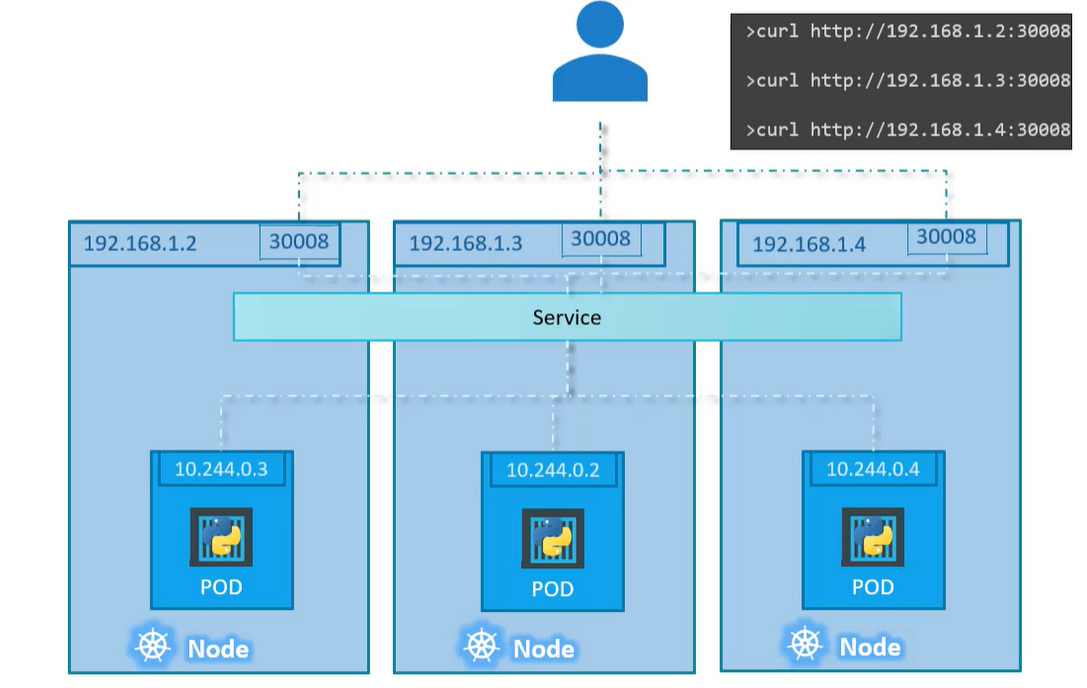
this service listens for requests on a specific port of a node and forward the request to the pod. Scope of this service is to allow access to cluster port i.e.
A service is a like a virtual server inside the node, it has it own IP address and port. The IP is called
Cluster IPof the service
A service definition file looks like
apiVersion: v1
kind: Service
metadata:
 name: myapp-service
spec:
 type: NodePort
 ports:
  - targetPort: 80 # port of the Pod where request will land eventually
    port: 80  # port of the service
    nodePort: 30008 # port on the node that allow us to access the node externally
 selector:
  app: myapp
  type: front-end
portfield is mandatory- Value for
nodePortrange varies between 30000 to 32767, you can provide one or k8s will automatically assign a random available port within range - If you don't provide any value for the
targetPort, k8s will use the value ofportby default portssection allow us to map multiple ports since it is an array.selectorwill allow us to map the service to an actual Pod running inside k8s- If you have multiple pods within the same node that have the same labels set in the
selectorof service, k8s will create the service that will allow to access to different number of pods without any extra setup/configuration. The load balancing will be done using algorith random. - If you have multiple pods that reside in different nodes that have the same labels set as
selectorin service and expose the same port , and you create anodePortservice, then- k8s will span the service across all nodes
targetPortwill map to the samenodePorton all the nodes in the cluster- You can access the relevant pod using the IP of node plus the node port as shown in diagram below
ClusterIP
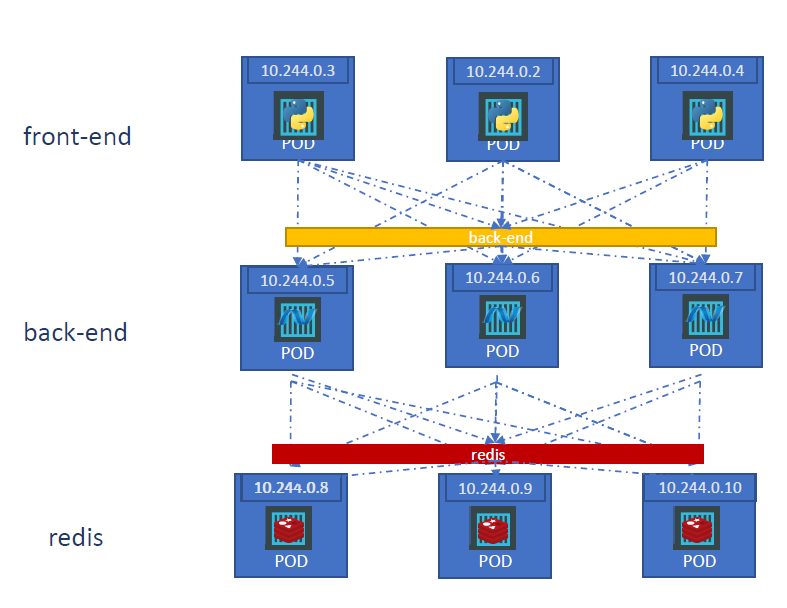
You can have multiple set of pods running inside a cluster for example a set of front end , backend and cache stores. Each set need to communicate to another set
- Front end to backend
- Backend to cache
- Backend to database
How can we establish the communication between different set of pods inside the cluster without relying on the IP addresses of the Pods as they can change whenever a Pod is removed or created again ?
We can create a set of services that will allow us to have a single interface to allow communication between a set of services
How to create a cluster ip service?
A service definition file looks like
apiVersion: v1
kind: Service
metadata:
 name: back-end
spec:
 type: ClusterIP
 ports:
  - targetPort: 80 # port of the Pod where request will land eventually
    port: 80  # port of the service
 selector:
  app: myapp
  type: front-end
LoadBalancer
This allow to provision a load balancer in supported cloud providers. Hence enabling to distribute the load across multiple nodes. For example load balancing to a set of front end server.
Ingress
An API object that manages external access to the services in a cluster, typically HTTP. An Ingress may be configured to give Services externally-reachable URLs, load balance traffic, terminate SSL / TLS, and offer name-based virtual hosting
Scenario
Let say we want to deploy a web app that will connect to database using a service. We want to access the application using www.onlinestore.com, we can expose the app using nodePort service and access the app using www.onlinestore.com:node-port.
Deployment on local data center
If we want to further make it simpler for user to access the website without adding the port while accessing the application, we can add a proxy server between our DNS server and the kubernetes cluster. The DNS server will forward the request to our proxy server (default port 80) and proxy server will forward it to the k8s on that specific port. This is how it is done we are deploying it on our data center
Deployment on a could provider
When we have the same scenario as mentioned above but instead of deploying it locally, we are using a cloud provider for example GCP. When we configure the application everything will be the same except the kubernetes will request GCP to provision a load balancer that will route traffic from DNS server to the load balancer and this will then forward it to the k8s.
Now if we want to introduce another service let's say www.onlinestore.com/watch and make the older application accessible using www.onlinestore.com/wear, we now have 2 set of applications deployed on same k8s cluster, each has it's own node port service to access, now how we can configure in cloud.
- Every service will have a different load balancer
- In order to route to different services, there will be another load balancer on top of it. (not a very efficient solution)
- This will over complicate the setup
- Where you will setup the SSL ?
- Every time you configure a new service you have make changes in load balancer as well
All of it can be done using Ingress a kubernetes object that will allow to expose multiple services, load balancing, routing and other stuff. The ingress still need to be exposed as a Node port service or a load balancer in cloud environment.
Without ingress we can do it using a reverse proxy or load balancing solution like nginx, HAProxy or traefik. We have to configure URL routes, configuring SSL certificates and other configuration.
Ingress is implemented by Kubernetes in kind of the same way, first deploy the supported solution and provide the configuration (a set of rules). The deployed solution is called
Ingress Controller. And the set of rules are calledIngress Resources.
By default k8s does not have an ingress controller, you have to install it manually
If you have a single service that need to be expose we can simply specify the service name and port like below
apiVersion: networking.k8s.io/v1
kind: Ingress
metadata:
 name: ingress-wear
spec:
 backend:
  service:
    name: wear-service
    port:
      number: 80
If you have multiple domain entries in your DNS, you can point them to same ingress controller in your K8s cluster. For example
You can specify rules to route traffic based on different conditions. Within each rule you can specify different paths to route traffic to different backend services.
For example for www.my-online-store.com we can have following paths
- /wear
- /watch
- /
So we have a rule for each domain name and against each rule and we can have multiple paths.
apiVersion: networking.k8s.io/v1
kind: Ingress
metadata:
 name: ingress-wear
spec:
 rules:
  - http:
     paths:
     - path: /wear
       pathType: Prefix
       backend:
        service:
         name: wear-service
         port:
          number: 80
     - path: /watch
       pathType: Prefix
       backend:
        service:
         name: watch-service
         port:
          number: 80
K8s expect a default backend service in case no path matches, it route traffic to that service
For multiple host names
apiVersion: networking.k8s.io/v1
kind: Ingress
metadata:
 name: ingress-wear
spec:
 rules:
  - host: wear.my-online-store.com
     http:
      paths:
      - pathType: Prefix
        backend:
         service:
          name: wear-service
          port:
           number: 80
  - host: watch.my-online-store.com
     http:
      paths:
       - pathType: Prefix
         backend:
          service:
           name: watch-service
           port:
            number: 80
kubectl create ingress simple --rule="/bar=barservice-name:portnumber" --rule="/foo=foo-service-name:portnumber
Networking Policies
Lets say we have a simple 3 tier architecture, a web server , an API server and a database server.
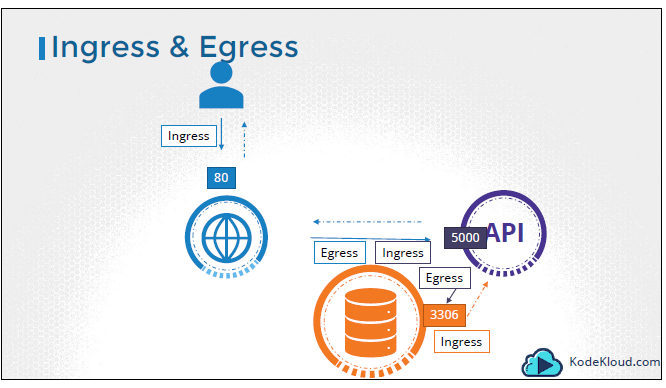
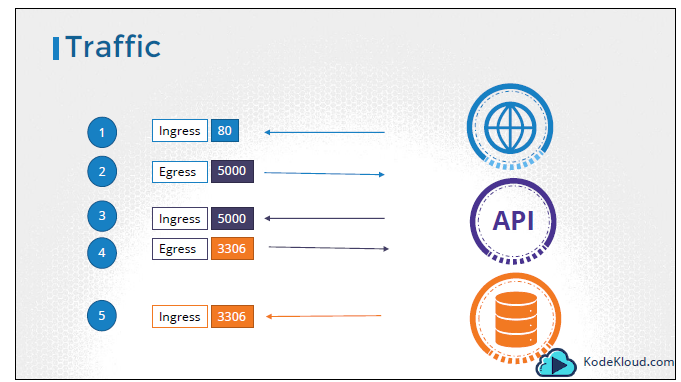
- User send request from browser to web server at port 80 (ingress)
- Web server send request to backend Server at port 5000 (egress)
- App server accept request at port 5000 (ingress)
- App Server send request to database server at port 3306 (egress)
- Database server receive request from app server at port 3306 (ingress)
By default all pods and services can communicate with each other in a node, there is no restriction, so k8s is set in Allow All mode.
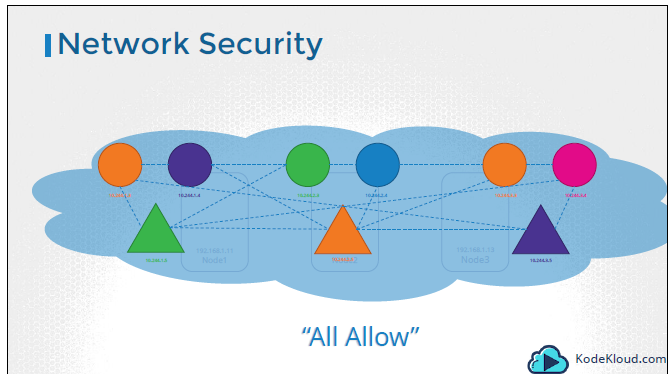
A network policy is another k8s object just like pod, services and replica sets. It allows us to isolate traffic (ingree/egress) to a pod. By default there is no isolation.
As discussed above , let us now create a policy that will only allow the traffic to database server from the backend server at port 3306
apiVersion: networking.k8s.io/v1
kind: NetworkPolicy
metadata:
 name: db-policy
spec:
 podSelector:   # pod on which we apply the policy
  matchLabels:
   role: db
 policyTypes:   # we can have both Ingress and Egress rules here
  - Ingress
 ingress:
  - from:
    - podSelector:  # pod that will be allowed to reach the above mentioned pod (role=db)
       matchLabels:
        name: api-pod
      namespaceSelector:  # if we want only pods (with label name=api-pod) from a specific namespace can reach to database, we provide a namespace selector also
       matchLabels:
        name: prod
    - ipBlock:
        cidr: 192.168.5.10/32
    ports:
     - protocol: TCP
       port: 3306
Things to note in above template
podSelectorandnamespaceSelectorworks asANDin above rule- If add a dash (-) just before the
namespaceSelectorthe first two rules will behave asOR - The first rule and second rule
ipBlockworks asOR - We don't have to add the egress for 3306 because the response from database to API will be allowed automatically
Kubernetes network policies are plugins based on the networking solution installed in cluster. Some of the solutions that support it are
- Kube-router
- Calico
- Romana
- Weave-net
Solutions that don't support Network policies are
- Flannel
Now what if we want the database server to send a request to backup server (an agent installed on db server).
apiVersion: networking.k8s.io/v1
kind: NetworkPolicy
metadata:
 name: db-policy
spec:
 podSelector:
  matchLabels:
   name: db-pod
 policyTypes:
  - Ingress
  - Egress
 ingress:
 - from:
   - podSelector:
      matchLabels:
       name: api-pod
   ports:
    protocol: TCP
    port: 3306
 egress:
 - to:
   - ipBlock:
      cidr: 192.168.5.10
   ports:
    protocol: TCP
    port: 3306